How to prevent Flash of Invisible Text with Webfonts
Are you seeing this message warning in your Lighthouse report?
Ensure text remains visible during Webfont load
It looks like you're using Webfonts!
The culprit you're looking for is called FOIT (flash of invisible text). This troublemaker also has a sibling called FOUT (flash of unstyled text), who is a lesser thorn in the eye for Lighthouse.
So, if you're wondering how to target FOIT to reduce CLS (Cumulative Layout Shift), keep reading.
Why FOIT happens: webfonts are async assets
Let's dive into what Webfonts are, how they work, and the chain of the problems, that ultimately manifests into the above-mentioned warning, produced by Lighthouse.
Understand Webfonts
When working in the web environment, there are two ways to customize the web app font to your liking.
- Using
font-familyproperty - Using
font-familyproperty, utilising a custom@font-faceruleset
Let's not get into the syntactical difference between a property and a ruleset, let's rather focus on the semantics.
When working with font-family you specify a priority list of font names (or generic family names) that the browser should attempt to load. If the first in the line is not found on the user device, the browser checks for the presence of the next one. So it goes, until it has found a font or we've run out of options and have to fall back to a browser default.
This is how you define a font-family:
body {
  font-family: "Raleway", "Helvetica", "Verdana", sans-serif;
}
The downside of the font-family property is obvious. You, as a developer of a web application have to rely on that a certain font is present on a user-device. That does not scale well, as you don't have any control over that whatsoever. No one likes unpredictability, right?
Enter Webfonts.
@font-face {
  font-family: "AwesomeCustomWebfont";
  src: url("https://myfontomain.com/AwesomeCustomWebfont.woff2"); // an example
}
Webfonts allow you to fetch and define a custom font, that is accessible via a URL, somewhere on the internet, and expose it as a font-family.
The concept removes the limitation of you, the developer, having to rely on what fonts are there available on end-user devices in order to get the font UX you strive for.
No more guessing, that's awesome, right? It is indeed, but remember, remotely-stored Webfont, similarly to an image or a JavaScript file, is a remote asset. And every remote asset brings asynchronicity.
Where there is asynchronicity, we need to pay extra attention to timing and default behavior, which is where the margin for issues comes into play.
Asset priority
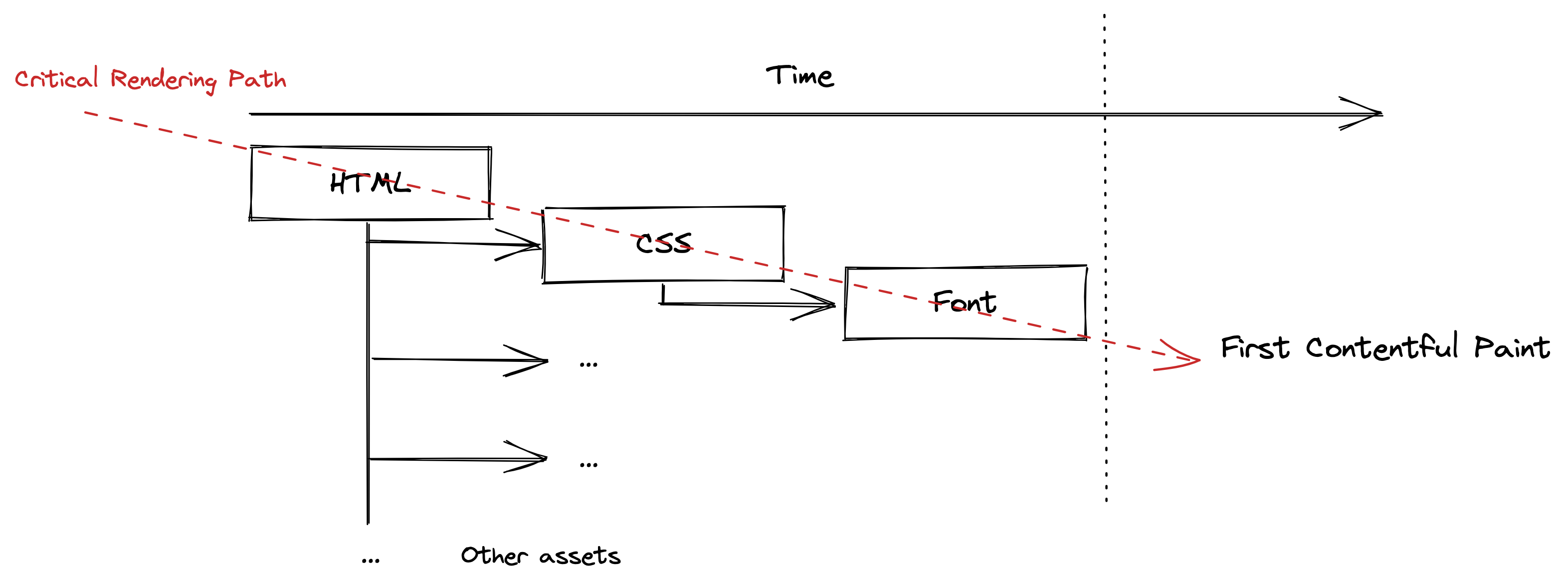
Even though fonts belong in the category of the high priority assets, it takes the browser some time to find out which font to download even before actually downloading it.
That's because it first needs to:
- Download and parse the HTML
- Download and parse the relevant CSS file (from which it retrieves the
font-faceURL) - Download the desired
font-face
That's quite a long path, just to get to the font-face. In fact, this path is a part of a longer walk, called Critical Rendering Path. It's basically a walk from point 0 to FCP (First Contentful Paint). Keeping it as short as possible is one of the main requirements of performant web applications.
That was a short detour to Webfonts and how browsers load assets. Let's see what solutions are there to ultimately get rid of the FOIT.
The fix: font-display: swap
There are two ways how to approach this problem. Ideally, you want to implement both of them.
- Decrease the time it takes to load the font.
- Define correct default behavior.
Decrease the time it takes to load the font
There are many layers we can optimize, to be able to fetch the font asset faster. We can:
- Serve it from the edge using a CDN (e.g. CloudFlare)
- Use link element to prefetch or preload the resource
- Reduce the size of the asset file
- etc.
I consider this topic out of the scope of this article, so let's discuss a straightforward solution.
Define correct default behavior
When an asset is asynchronous, the go-to solution is always to define a default behavior, to cope with the interval when it's not present.
@font-face {
  font-family: "AwesomeCustomWebfont";
  src: url("https://myfontomain.com/AwesomeCustomWebfont.woff2"); // an example
  font-display: swap; // Magic 🪄
}
The default behavior of an asynchronous font is defined by the font-display property. Use the swap option to render a User-Agent default font as a placeholder, while your font is being downloaded.
How does it work
It's not surprising, that modern browsers that support font-face, also implement font-display. (I don't consider IE11 a modern browser)
font-display gives you two options on what to render when the asset is being downloaded:
- Render a fallback font.
- Render nothing. (But cause FOIT)
From what we can observe, Google/Lighthouse clearly prefers option 1., which is the standard for complying with Core Web Vitals.
The problem is the majority of modern browsers by default fall back to option 2. So always do override it.
Conclusion
When defining a custom font-face, always couple it with font-display: swap. Most modern User-Agents use a default font-display: block, which unfortunately causes the flash of invisible text. Swap the font instead and there goes the FOIT!
Your users will thank you and Google will award you some bonus points.
FAQ
What is FOIT?
Flash Of Invisible Text — the period where text is hidden while a webfont downloads. FOUT (Flash Of Unstyled Text) is the milder sibling where a fallback font shows first, then swaps.
How do I fix 'Ensure text remains visible during Webfont load'?
Add font-display: swap to your @font-face rule. The browser then renders a fallback font immediately and swaps in your webfont once it loads, instead of hiding the text.
Why does FOIT happen by default?
Most modern browsers default to font-display: block, which hides text while the webfont downloads. You have to override it with font-display: swap.
What is the difference between font-display: swap and block?
block hides text during load (causing FOIT); swap shows a fallback font immediately and swaps to the webfont when ready, keeping text visible.
Besides font-display, how else can I speed up webfont loading?
Serve the font from a CDN/edge, preload or prefetch it with a link element, and reduce the asset's file size — all shorten the critical rendering path to the font.